# How Rails Authenticity Tokens Protect Against CSRF Vulnerability
*Published on February 17, 2023*
Tags: Rails Internals
---
In the previous article, we learned [how Cross-Site Request Forgery (CSRF) vulnerability works](/how-csrf-attack-works-cross-site-request-forgery) by tricking the authenticated users into performing a dangerous activity on the application, such as transferring funds or granting access to a protected resource.
In this post, we'll learn how Ruby on Rails helps prevent CSRF attacks using authenticity tokens. It covers the following topics:
- What are authenticity tokens in Rails
- How Rails adds authenticity tokens to the forms
- How Rails verifies authenticity tokens
- Preventing Cross-Origin Requests
- How to disable CSRF protection in Rails (and when you should)
Let's get started.
## What are Authenticity Tokens in Rails?
If you've been building web apps using Rails even for a while, you must have encountered a hidden input with a strange value in the rendered HTML forms.
```html
```
These cryptic values are called authenticity tokens, and they help you prevent CSRF vulnerability.
Rails automatically generates a CSRF token whenever the application requests a form. This token is also stored in the user's session and changes each time the session is regenerated. Hence, a malicious application cannot access it.
When the user submits the form and the request reaches your application, Rails verifies the received token with the token in the session. If the two match, it means the request is verified, and Rails will allow it.
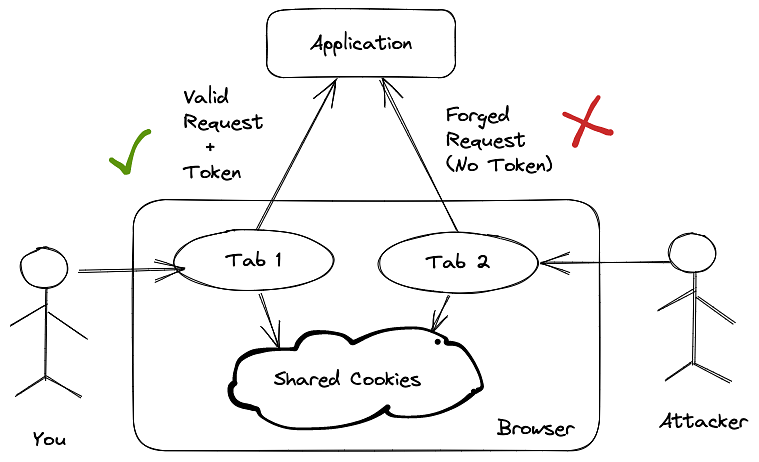
If the tokens don't match, an `ActionController::InvalidAuthenticityToken` error is raised, indicating that the request is unverified. **This ensures that the authenticated user is the person making the requests to the application.**
> Rails checks all requests except the GET requests, as these should be idempotent, that is, they should not have any side effects.
## How Rails Adds Authenticity Tokens to the Forms
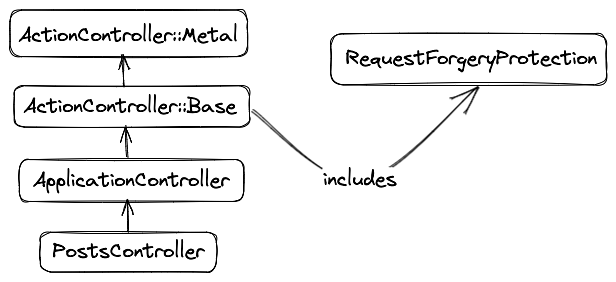
The [`ActionController::RequestForgeryProtection`](https://api.rubyonrails.org/classes/ActionController/RequestForgeryProtection.html) module (which is a [concern](/how-rails-concerns-work-and-how-to-use-them)) contains the logic related to CSRF protection. It includes methods that generate the tokens and check if the tokens match. This module is included in all Rails controllers via the `ActionController::Base` class.
_To learn more about concerns in Rails, check out the following post_: [Concerns in Rails: Everything You Need to Know](/how-rails-concerns-work-and-how-to-use-them)
Let's inspect the code snippet introduced near the beginning of this article.
```html
```
When you use the `form_with` helper to generate a form, Rails automatically inserts the hidden `authenticity_token` in the form. It also stores this token as a random string in the session, to which an attacker does not have access.
**Passing Custom Authenticity Tokens**
If you want to pass a custom authenticity token, you can pass it using the `:authenticity_token` option. This is useful when you build forms to external resources.
```html
<%= form_with(url: sessions_path, authenticity_token: 'random_token') do |form| %>
<% end %>
# Generates
```
If you don't want the token for some reason, pass `false` to the above option.
```html
<%= form_with(url: sessions_path, authenticity_token: false) do |form| %>
<% end %>
```
## How Rails Verifies Authenticity Tokens
When the application starts and `ActionController::Base` class loads, Rails calls the `RequestForgeryProtection#protect_from_forgery` method from an [initializer](/introduction-to-rails-initializers), passing `:exception` as the forgery protection strategy. It means that Rails will throw an exception for unverified requests.
```ruby
# actionpack/lib/action_controller/railtie.rb
initializer "action_controller.request_forgery_protection" do |app|
ActiveSupport.on_load(:action_controller_base) do
if app.config.action_controller.default_protect_from_forgery
protect_from_forgery with: :exception
end
end
end
```
_To learn more about how Rails initializers work, check out following post_: [A Brief Introduction to Rails Initializers](/introduction-to-rails-initializers)[
](/introduction-to-rails-initializers)
The `protect_from_forgery` method adds a `before_action` callback on the controller, calling `verify_authenticity_token` method for each request.
```ruby
# lib/action_controller/metal/request_forgery_protection.rb
def protect_from_forgery(options = {})
self.forgery_protection_strategy = protection_method_class(options[:with] || :null_session)
self.request_forgery_protection_token ||= :authenticity_token
before_action :verify_authenticity_token, options
end
```
Whenever a request arrives, Rails executes the `verify_authenticity_token` method, which verifies that the token in the request input matches the token stored in the session.
In its essence, this method checks the following conditions to ensure that the request is verified:
1. Is it a `GET` or `HEAD` request? `GET` requests should be safe and idempotent.
2. Does the authenticity token from the form match the stored token value?
```ruby
def verified_request?
!protect_against_forgery? || request.get? || request.head? ||
(valid_request_origin? && any_authenticity_token_valid?)
end
```
When these conditions are satisfied, we know that the authenticated user is the one initiating the request.
## Preventing Cross-Origin Requests
At this point, you might be wondering what's stopping an attacker from
1. Write JavaScript code that makes a GET request to the Rails app,
2. Parse its HTML contents to retrieve the authenticity token, and
3. Use it to make a forged request by inserting the token as part of the request
The Rails app, upon receiving the request would be fooled into thinking it came from the user's app since it contains the authenticity token.
**Rails prevents the above scenario by verifying if the request originated from the same origin by looking at the** [**`Origin`**](https://developer.mozilla.org/en-US/docs/Web/HTTP/Headers/Origin) **header.** The **`Origin`** request header indicates the [origin](https://developer.mozilla.org/en-US/docs/Glossary/Origin) (scheme, hostname, and port) that _caused_ the request.
> The [**same-origin policy**](https://developer.mozilla.org/en-US/docs/Web/Security/Same-origin_policy) is a critical security mechanism that restricts how a document or script loaded by one [origin](https://developer.mozilla.org/en-US/docs/Glossary/Origin) can interact with a resource from another origin.
Note the `valid_request_origin?` method above. Here's its implementation.
```ruby
def valid_request_origin?
if forgery_protection_origin_check
# We accept blank origin headers because some user agents don't send it.
raise InvalidAuthenticityToken, NULL_ORIGIN_MESSAGE if request.origin == "null"
request.origin.nil? || request.origin == request.base_url
else
true
end
end
```
Typically, browsers add the `Origin` request header to:
- [Cross Origin](https://developer.mozilla.org/en-US/docs/Glossary/CORS) requests, and
- [Same-Origin](https://developer.mozilla.org/en-US/docs/Web/Security/Same-origin_policy) requests except for [`GET`](https://developer.mozilla.org/en-US/docs/Web/HTTP/Methods/GET) or [`HEAD`](https://developer.mozilla.org/en-US/docs/Web/HTTP/Methods/HEAD) requests (i.e. they are added to same-origin [`POST`](https://developer.mozilla.org/en-US/docs/Web/HTTP/Methods/POST), [`OPTIONS`](https://developer.mozilla.org/en-US/docs/Web/HTTP/Methods/OPTIONS), [`PUT`](https://developer.mozilla.org/en-US/docs/Web/HTTP/Methods/PUT), [`PATCH`](https://developer.mozilla.org/en-US/docs/Web/HTTP/Methods/PATCH), and [`DELETE`](https://developer.mozilla.org/en-US/docs/Web/HTTP/Methods/DELETE) requests).
Since the attacker's `Origin` header won't match the request's `base_url`, the `valid_request_origin?` method will return false, and Rails will handle the request just like an unverified request.
## How to Disable CSRF Protection in Rails
Sometimes, you want to disable the CSRF mechanism on specific controllers, for example, a controller that handles POST callback requests from Stripe to process payments. **As Stripe doesn't know your CSRF token, Rails will block these requests.**
You can disable CSRF protection on a specific controller using the `skip_forgery_protection` method.
```ruby
class StripeController < ApplicationController
skip_forgery_protection
end
```
Behind the scenes, it calls `skip_before_action` to prevent calling `verify_authenticity_token` method.
```ruby
def skip_forgery_protection(options = {})
skip_before_action :verify_authenticity_token
end
```
This will allow any callback requests from Stripe to your application.
## Conclusion
I hope you have a better understanding of how a Cross-Site Request Forgery attack works and how Rails mitigates it using authenticity tokens. Though it's not a common vulnerability, it's an important one to safeguard your application from.
Here's how Rails guides describe it:
> CSRF appears very rarely in CVE (Common Vulnerabilities and Exposures) - less than 0.1% in 2006 - but it really is a 'sleeping giant' [Grossman]. This is in stark contrast to the results in many security contract works - _CSRF is an important security issue_.
If you are not using Rails form helpers, please use an `authenticity_token` to protect your `POST`, `PUT/PATCH`, and `DELETE` methods. Also, make sure that none of the `GET` requests cause any side effects on the server.