# How to Implement Rails-like Dynamic Views in Ruby
*Published on July 15, 2023*
---
When I first started learning Rails, one of the patterns that I thought was pure 'magic' was how you could access a controller's instance variables in the views.
```ruby
# controllers/posts_controller.rb
class PostsController
def show
@post = Post.find(1)
end
end
# views/posts/show.html.erb
<%= @post.title %>
```
For a long time, I didn't understand how this would work behind the scenes. I tried reading the source code a few times without success. I just wasn't familiar enough with Ruby's advanced metaprogramming techniques.
If you're feeling the same, worry not. In this lesson, we'll learn one way to implement the Rails views pattern, where a controller's instance variables are accessible in the view, in pure Ruby.
This post won't show how Rails actually implements the views behind the scenes. I'm only trying to mimic the external Rails API, i.e. making controller instance variables available in views.
As things stand now, our controllers are returning a plain text response from the `index` action method. The router calls the controller's action to get this plain text response and returns it to the browser.
```ruby
require_relative 'application_controller'
class ArticlesController < ApplicationController
def index
index_file = File.join(Dir.pwd, "views", "index.html")
File.read(index_file)
end
end
```
To make it behave like Rails, we'll want to assign the data required by a view to instance variables:
```ruby
require_relative 'application_controller'
class ArticlesController < ApplicationController
def index
@title = "Write Software, Well"
@tagline = "Learn to program Ruby and build webapps with Rails"
end
end
```
Then, the instance variables `@title` and `@tagline` will be used by the corresponding view, just like Rails.
```html
<%# views/articles/index.html.erb %>
<%= @title %>
<%= @tagline %>
```
We'll learn how to can implement this later. But let's solve a simpler problem first.
## Understanding the Concept of Binding in Ruby
Before trying to implement the above feature, let's try to solve a different, simpler problem. **How can we access instance variables in a string template?**
Binding is an elegant way to access the current scope (variables, methods, and `self`) in Ruby. Typically, you use it for building view templates and executing strings of Ruby code. The Ruby REPL also makes abundant use of binding.
**The basic idea behind binding is to store the current context in an object for later use. Later, you can execute some code in the context of that binding, using** **`eval`****.**
A Ruby binding is an instance of the `Binding` class. It's an object that packages or encapsulates the current scope, allowing you to pass it around in your code.
> 💡 Objects of class [`Binding`](https://docs.ruby-lang.org/en/3.2/Binding.html) encapsulate the execution context at some particular place in the code and retain this context for future use. The variables, methods, and value of `self` that can be accessed in this context are all retained. [`Binding`](https://docs.ruby-lang.org/en/3.2/Binding.html) objects can be created using [`Kernel#binding`](https://docs.ruby-lang.org/en/3.2/Kernel.html#method-i-binding). - [Ruby Docs](https://docs.ruby-lang.org/en/3.2/Binding.html)
The [`Kernel#binding`](https://ruby-doc.org/3.2.0/Kernel.html#method-i-binding) method returns the current binding object. Think of this binding object as a wrapper that encapsulates the current programming environment, i.e. variables, methods, and even the `self` object.
The most common and realistic use case for a binding object is to use it later to fill some pre-defined slots in a template, like ERB views. So you save the current context including variables in a binding, and use it somewhere else to generate the final views, just like Rails. Let's learn how ERB makes use of binding.
## Using ERB with Binding
[`ERB`](https://docs.ruby-lang.org/en/3.2/ERB.html) provides an easy to use but powerful templating system for Ruby. Using ERB, Ruby code can be added to any plain text document for the purposes of generating document information details and/or flow control.
The following code substitutes variables into a template string with `erb`. It uses `Kernel#binding` method to get the current context.
```ruby
require 'erb'
name = 'Akshay'
age = 30
erb = ERB.new 'My name is <%= name %> and I am <%= age %> years old'
puts erb.result(binding)
# Output:
#
# "My name is Akshay and I am 30 years old"
```
Note the `<%= title %>` statement. Within an erb template, Ruby code can be included using both `<% %>` and `<%= %>` tags.
The `<% %>` tags are used to execute Ruby code that does not return anything, such as conditions, loops, or blocks, and the `<%= %>` tags are used when you want to output the result.
**What's going on in the above example?**
1. After requiring the `ERB` gem and creating a few variables, we create an instance of the `ERB` class with a template string.
2. We create a `Binding` object by calling the [`Kernel#binding`](https://ruby-doc.org/3.2.0/Kernel.html#method-i-binding) method. Again, think of the binding object as a wrapper that includes the current programming environment with variables like `name` and `age`, methods, and even the `self` object.
3. The `result` method on the `erb` object uses this binding object and the variables defined in that binding to replace the slots in the template string, generating the final string printed above.
I hope that you now have a good understanding of the concept of binding. **The basic idea behind binding is to store the current context in an object for later use.** To tie it back to our web application, we'll use binding of a controller action method to access the instance variables in the view.
However, the concept of binding also extends to the instance variables of a class. That means if you get the `binding` in the scope of an instance of a class, it contains the instance variables which you can use in an ERB template. The following example will make it clear.
```ruby
require 'erb'
class Person
def initialize
@name = 'Akshay'
@age = 30
end
def get_binding
binding
end
end
ak = Person.new
erb = ERB.new 'My name is <%= @name %> and I am <%= @age %> years old'
puts erb.result(ak.get_binding)
# Output
# ======
# My name is Akshay and I am 30 years old
```
In the above code, the `Person#get_binding` method returns the binding of an instance of the `Person` class. When we call `ak.get_binding`, it returns the binding of the instance `ak` and contains the instance variables `@name` and `@age`, which ERB uses to fill the string template.
Now that you understand how a template can access the instance variables of a class, let's go back to the original problem: **accessing controller instance variables in the view template**. We'll implement it in three simple steps.
## Step One: Add a render Method on the Controller
Let's require the `erb` gem and add a new method called `render` on the `ApplicationController` class. We're adding it to the base controller class so that all controller classes will inherit it.
```ruby
require 'erb'
class ApplicationController
attr_reader :env
def initialize(env)
@env = env
end
# new method
def render(view_template)
erb_template = ERB.new File.read(view_template)
erb_template.result(binding)
end
end
```
The new code does the same thing that we saw in our simplified example earlier. However, there're three important things to note here:
1. It reads the string template from a file called `view_template`, which we'll learn more about later.
2. Then it calls the `binding` method to get the binding in the context of the controller class, making all the instance variables available to the binding.
3. Finally, it renders the response by calling the `result` method on the ERB template and passing the binding.
If this sounds confusing, don't worry. I promise everything will start making sense very soon, especially once you see how we use the `render` method!
## Step Two: Render from Router
We're almost done. The reason we added the `render` method to the controller class was to call it from the router, once the instance variables are set.
Modify the router's `get` method so it looks like this.
```ruby
def get(path, &blk)
if blk
@routes[path] = blk
else
@routes[path] = ->(env) {
controller_name, action_name = find_controller_action(path) # 'articles', 'index'
controller_klass = constantize(controller_name) # ArticlesController
controller = controller_klass.new(env) # controller = ArticlesController.new(env)
controller.send(action_name.to_sym) # controller.index
controller.render("views/#{controller_name}/#{action_name}.html.erb")
}
end
end
```
**The most important point is that we've separated the action-calling and response-rendering mechanisms.**
Before, we were simply calling the action method on the controller and returning whatever response the action method returned.
Now, we first call the action method so that it gets a chance to set the instance variables. Then, we call the `render` method we just created, and pass it the name of the dynamically generated view template `views/articles/index.html.erb` following Rails conventions.
Inside the `render` method, the instance variables are already set, since it's the same controller instance. Hence it can render the view template without any problem.
We now have all the pieces in place. The only thing remaining is to use them. Let's update the controller so it sets the instance variables and add a view template that uses the instance variables.
## Step 3: Update the Controller and Create the View Template
Modify the `ArticlesController` class, so that the `index` action only sets the instance variables, instead of returning the response.
```ruby
class ArticlesController < ApplicationController
def index
@title = "Write Software, Well"
@tagline = "Learn to program Ruby and build webapps with Rails"
end
end
```
Next, create a new `articles` directory inside the `views` directory, and add a view template `index.html.erb` in it. Delete the old `views/index.html` file.
```html
Application
<%= @title %>
<%= @tagline %>
```
Don't worry, we'll extract all the layout code in a separate template in a future post.
To make things pretty, I've updated the `style.css` as follows:
```css
main {
width: 600px;
margin: 1em auto;
font-family: sans-serif;
}
header {
text-align: center;
margin-bottom: 2em;
}
article {
padding-top: 1em;
}
```
That's it, we're done. Now restart the application and visit `localhost:9292/articles/index` in the browser. You should see the following page:
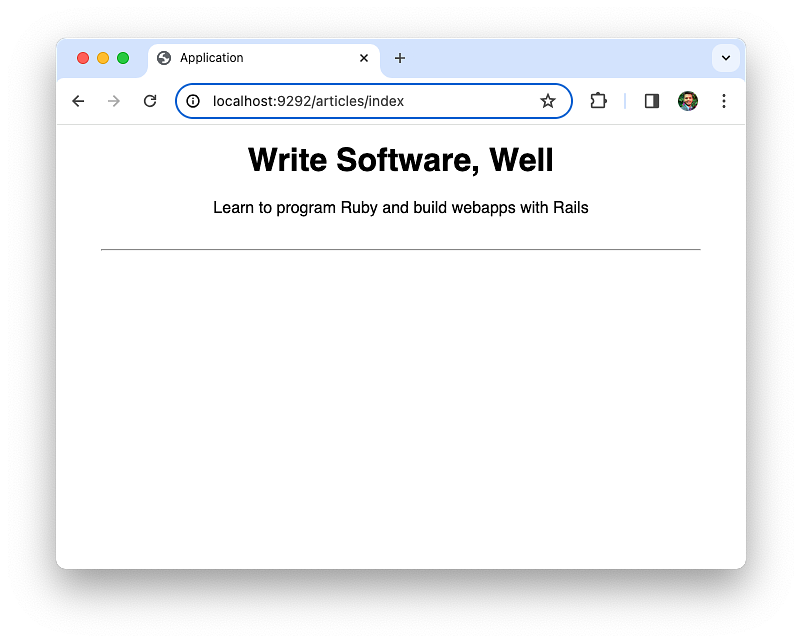
Any new instance variables you set in the controller's action method will be available to use in the view.
💡 Check out the final code in the [GitHub repository](https://github.com/akshayKhot/weby/tree/views) in 'views' branch.
**That's a wrap. In the upcoming posts, we'll:**
- Implement models just like Rails!
- Improve the project structure and organization
- Add unit tests
- Handle errors and logging
- Process form inputs along with query strings into a `params` object
- Connect to the database to store and fetch data
- Add middleware to handle specific tasks like authentication
- and much more...
Trust me, it's going to be a lot of fun, so **stay tuned!!**